

How many times have been frustrated by "right-click and ope link in a new Tab" especially when you have many links to open for example in a search.
Here is a really nifty Firefox add-on that lets you open block of links just with one click ! It lets you select multiple link by allowing you to draw a box around them.
This add-on should definitely be added as a regular feature in Firefox 3 make you think why hasn't someone else thought of this before ?
Get this Add-on
You can draw the select box by right click once selected the links opens in a new tab.. Sweet !
Showing posts with label Firefox Add-ons. Show all posts
Showing posts with label Firefox Add-ons. Show all posts
October 2, 2007
Open multiple links with Snap links Firefox Add-on


September 21, 2007
Firefox Sessions Manager Add-ons
There was a time not long ago when you used to have tons of Internet explorer windows and performed acrobatics with the Alt Tab to jump between different sites. Then came marvel called Tabbed browsing and yet the human's greed for innovation is insatiable. Presenting the Firefox Session Manager that lets you save a session and retrieve the session including tens of tabs you had open.
Session Manager Add-on that lets you do just that. You can save a current session and retrieve any crashes sessions. It also lets you name a session which means you can open tons of tabs and just save them. Great for eBay auctions when you are watching many items, or when you have many google search tabs !
Get the Add-on
But if Session Manager is too much and all you wanted was to save a session then Save session is for you. Get the Add-on
Also check out how you can Restart Firefox after enabling or disabling or changing a theme.
HyperWords Add-on makes reading internet richer and faster
With so much content on the web it is obvious we hit some rather heavy words or terms. Googling these words almost second nature while browsing through the internet. Here is an add-on that makes this even simpler and richer.
All you need to do is install the Add-on in your firefox and you are set for resolving terms, phrases and personalities faster with few mouse gesture.
Get the Add-on For Firefox
Thanks to the settings the Hyperwords Menu can be set only launch when you press shift and right click otherwise earlier it was launched whenever you selected a text with a really annoyance.
Features like Reference, One click Search, Multiple language translation was impressive. But the really cool feature is the Picture search option which retrieves image immediately and shows a preview.
According to the Hyperwords team:-A basic function of Hyperwords is to select text on a web page into get other information abut the text. You are no longer restricted to following only the links others have made for you.
Selecting text is simple: either double-click on a word, double-click between two words (like in a name) to select both, or stripe/drag-select a larger selection of text.
If for some reason you wanted to find out the prime minister of Kazakhstan, just select Kazakhstan and select 'References' from the menu that pops up and then select 'Wikipedia' from the menu.
You should now be seeing the Wikipedia entry open in a new window to the left of this one.
If you prefer to have the results open up in the same window (this one) or in a tab in the background, you can change it in Preferences.
Here is the tutorial video:-
September 12, 2007
Restart your Firefox after changing theme / Add-on
If you are enabling an add-on or installing/changing the theme in your firefox the effect will be seen only after the Firefox is restarted make you wish if there was a Restart Button like you get when you Install a Add-on.
And if you were working on many tabs, invariably you loose all the tab information and because you can't restore a session if you accept to close tabs
Here is a simple solution that make you wonder why didn't the Firefox think of this ?
A simple Firefox add-on called Restarter ! Now if you need to change a theme on your Firefox or need to enable or disable a firefox add-on / extention all you need to do is Click on Restart Firefox from File Menu.
Get Restarter Add-on
You will be prompted to agree to close the open tabs, All you tabs will be restored once firefox is restarted.
August 29, 2007
PicLens - Slideshow Firefox add-on for Flickr, Facebook
PicLens is an awesome Slideshow Add-on for Firefox. It shows the pictures in a PicLens enabled websites sites such as Flickr, Picasa, Facebook in a slideshow.
What's impressive about this extension how seamless it works with the website. All you need to do to see the pictures / photos in a slideshow is simply keep mouseover any image on one of the Piclens supported sites. A play button appears clicking which will launch this application.
The application itself is smooth and polished one. It gives you out of browser experience on the entire screen especially when the website doesnt do justice with a nice big photo.Great for showing family vacation or just getting lost in beautiful photos like I did listening to some groovy music !
Sites currently support by Piclens
Related Post :-
August 17, 2007
Firefox Add-ons to spice up your Tabs
Tabbed browsing is the hallmark of Firefox. Its an awesome feature but having a insatiable number of tabs can be quite a challenge. Add-ons to the rescue. Here are some nifty add-ons that makes tabbed browsing easy and fun. Also find out how to switch between tabs like the Alt + Tab in windows !
Here is quick tip: Did you know that you can scroll through the tabs by keeping the mouse over the tabs and scrolling the mouse wheel.
1) Switch between tabs by Ctrl + Tab
All of us who are spoilt by windows task switcher Alt + Tab always looking for a similar tab switcher in firefox. Luckily there is a Firefox extension.
Ctrl Tab Preview is a neat firefox add-on which allows you to switch between tabs also gives you a preview of the different tabs.
Get the Add-on >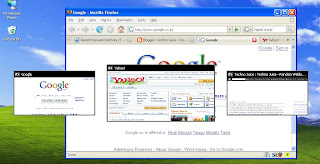
2) Colorful tabs based on URL
Now colorful tabs are a tad too tacky for my taste but sometimes from the haystack of Tabs color tabs specific to the website loaded is helpful, so all the tabs with google.com will have same color. ChromaTabs is the add-on.
Get the Add-on >
3) Open Tab next to current Tab
Whenever you open a link in a new tab it opens at the last of the tab list which is annoying if you have a lot of tabs.
Tab Control add-on lets you control the tab:-
Get the Add-on >
4) Zoom the mouse over tab
This add-on is called Fish eye an alternative to scrolling when there are many open tabs, and they become too small to see. User can zoom tab labels by moving the mouse cursor over them. Fisheye zoom is activated only when tabs occupy the whole width of the window.
Click the below button to see the video of Fish eye Tab plugin in action.
Get the Add-on >
5) Scroll bar for Tab overflow
This Tab Plugin adds a horizontal scrollbar below the tab bar when Firefox 2 is in tab overflow mode for easier tab navigation.
Get the Add-on >
August 13, 2007
How to see dead pages? Resurrect Them from Cache/Mirror
Now dead pages are so annoying and sometimes make you feel desperate especially when you are searching for that coding solution and the excerpt on google result looked so tempting only to find a dead page.
Well now with this Firefox-add on you can resurrect them (from the cache atleast).
Dead pages or broken link can due to many things bandwidth exceed, changing the URL. So here is a cleaver bit of an add-on, search engines crawlers add the page to the cache, so most pages have a mirror URL. When you do come across the error Unable to connect you get an opting to see this page from the various Cache such as Google, MSN, Yahoo, Internet archive.
Get the Add-on
August 11, 2007
Make your Firefox look like Internet Explorer, Safari
Here is a feat only a Firefox add-on theme can achieve. Now just by installing a theme you can make your Firefox look like other browsers ! Now I fail to reason why would one want to do that, if you get it let me know ! Anyhoo,
1) Make your Firefox Look like Internet Explorer 6
Just as expected same old Internet explorer 6 with tabbed browsing !
Here is how it looks:-
Get it now
2) Make your Firefox Look Like Internet Explorer 7
This one truly awesome, it totally replicates the essence of IE7 and feels damn good too !
3) Make your Firefox Look Like Safari
Now I was impressed with this one, the striking resemblance between the two. Even the buttons and Scroll bar looks amazingly similar.
Do check out our hack on how to Install Firefox addon for Multiple Users in Windows
July 19, 2007
Firefox Add-ons
Now firefox extentions (add ons / plug in) are an awesome example what Open source movement can achieve that monstrous corporations cant and results in really innovative apps which are simply cool !
Now check out IE idea of an add-on (duh!) They are playing catch-up to the amazing range of Add-ons you have in Firefox ... Long live open source !
I'll give a detailed review of each in due time, but here is a snippet of some of the really useful ones :-
- VideoDownloader - A nifty little add on that lets you download flash video and save as .flv in websites such as youtube, metacafe, iFilm etc. Once installed it sits on the bottom corner to be at your service when ever required.
- Foxy tunes - An awesome add on if you spend almost all time browsing
 and listening to music at the same time. You can control pretty much any music app (winamp, WMP, itune and much more) from your browser. Not just that you can find bio, lyrics and much more !
 - Loop to PDF - This is a handy little thingamagie, kinda like swiss knife for PDF. You can convert the html page to PDF.

- Internote - This is a lifesaver when you are using the internet to search something and collecting a lot of info. When ever you find some info you can launch this app like a sticky note and add the info which you can access later via its manager. Forget about opening a notepad or saving to your over flooded bookmarks
- Copy Plain text is a useful plugin for those times when you copy and all the formatting with links, bold etc is also copied and you have to open a notepad just to un-format it . This plug in add a option to the right click called "Copy Plain Text"


Subscribe to:
Posts (Atom)


